Someone comments LINK, but the DM never arrives. Before changing the whole setup, check the post, the keyword, and the reply type.
Instagram comment automation is a saved rule that sends a reply when a comment matches your settings. A DM is a direct message. In WinkSend, you can send a DM, a public comment reply, or both.
New to this? Follow the setup below. Already have a rule? Jump to the missing-DM checks.
Set up a comment-to-DM reply in WinkSend
Connect your Instagram Business or Creator account to WinkSend. Then:
- Open Instagram → Automations.
- Choose New automation → Standard Builder.
- Select Post & Reel Comments + DM. Continue to the builder.
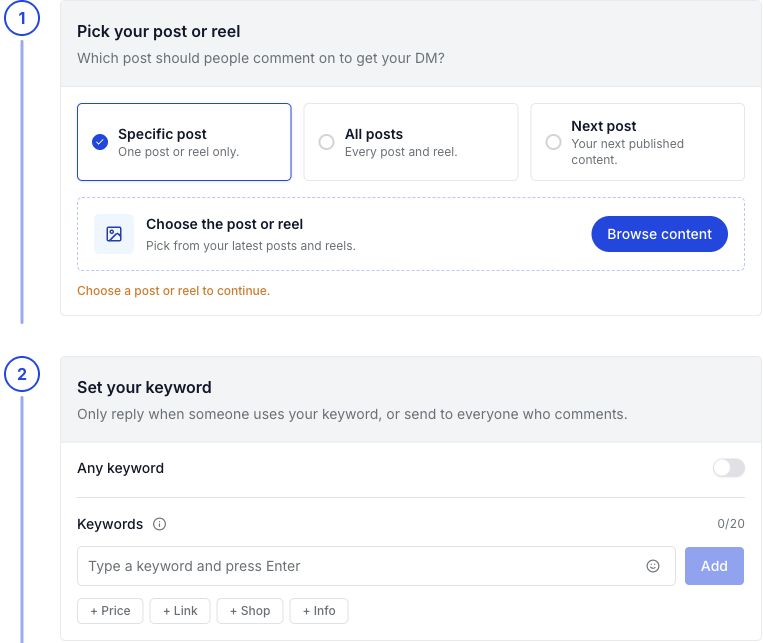
- Under Pick your post or reel, choose Specific post and use Browse content to select it.
- Under Set your keyword, add LINK. Keep Any keyword off if you only want replies for that word.
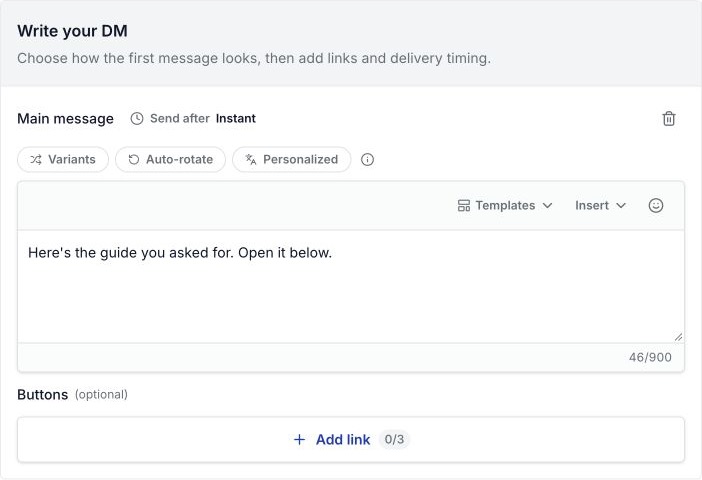
- Under Write your DM, choose Add message. Add a short text reply and your link.
- Review any opening message, follow request, or email step. For a first test, keep the path simple.
- Turn on Go live and choose Save changes. Check that the rule shows as live in the list.
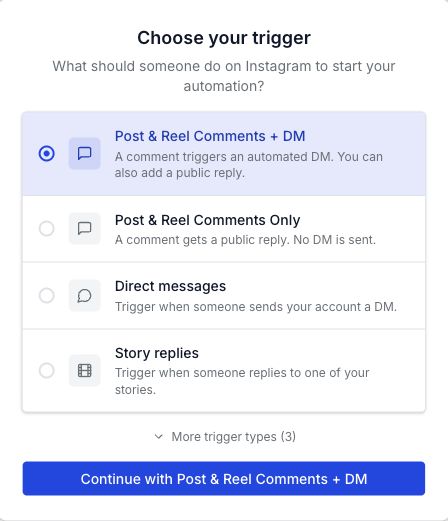
Post & Reel Comments Only sends a public reply. It does not send a DM. If that is your rule type, a missing private message is expected.
Under Write your DM, add a Text message. The example below is an unsaved sample. Choose Add link to put a button below the reply.
For the button fields, follow Add a link button. For a file message, use Send an image or PDF.
Make the caption and DM agree
Here is a sample you can edit:
- Caption: “Want the packing checklist? Comment LINK and I’ll send it.”
- Keyword: LINK.
- DM: “Here’s the packing checklist: [your guide link]. Save it for your next trip.”
Open the link on a phone. Does it show the checklist you promised? If it asks for an email first, say that in your caption.
For a PDF campaign, use the free-guide delivery steps. They cover file access and download checks.
No DM? Find where the reply stopped
Test from another Instagram account. Check its inbox and message requests.
For people who do not follow you, Meta sends the private reply to requests. See Meta’s private-reply guide.
| What happened? | What to check | Next step |
|---|---|---|
| No reply | Post, keyword, live status | Match the post and word. Save as live. |
| Public reply only | Trigger type, DM content | Choose Comments + DM. Add your message. |
| Opening DM only | Quick reply, follow, email step | Finish the step shown in the DM. |
| Marked sent, not found | Inbox, requests | Check both in the account that commented. |
| Wrong link | Saved message | Replace the link. Test it on a phone. |
| Several rules stopped | Connection, run allowance | Check usage and any reconnect notice. |
| No follow-up | Response, timing | Check the limits below. A link click is not a reply. |
An opening message can add a quick reply before the main DM. The follow and email steps shown below need that opening message first.
Use the email collection guide for the request and retry choices.
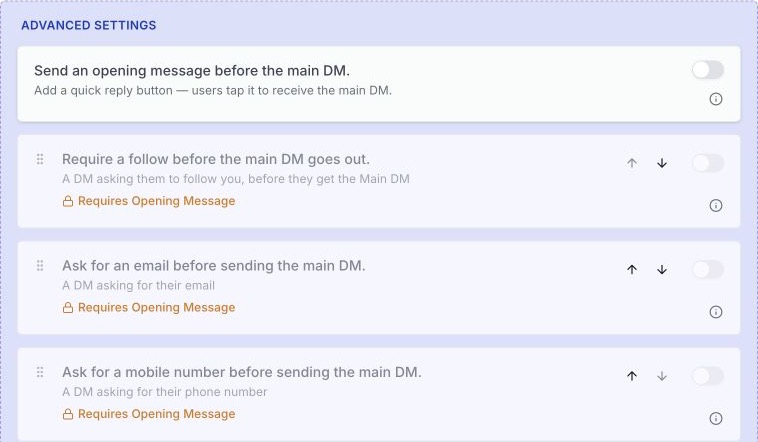
If the first DM arrives, leave that part alone. Check the next step that failed. Changing everything at once makes it harder to find the cause.
Test with another account
- Use an account that has not already tested this post.
- Leave the exact word from your caption.
- Check the inbox and message requests.
- Complete any quick reply, follow request, or email step you chose.
- Open the link on a phone.
- Note what arrived and where the path stopped.
A preview helps you check the design. This test checks the comment, message, and link together.
Do not keep repeating the same comment and expect a fresh test each time. Manychat’s trigger guide documents a repeat-comment limit for Instagram automation. Use a fresh test account and record what happens in your own setup.
The first reply and follow-ups have different limits
For post and Reel comments, Meta allows one initial private reply within seven days. Follow-up messages need a response from the recipient and must be sent within 24 hours of that response.
The seven-day limit is permission to send that first reply. It does not mean WinkSend will pick up every old comment after you turn on a rule.
Opening a website link does not itself open the follow-up window. Manychat explains this difference for website buttons. For a simple link campaign, put the promised resource in the first message.
Choose where the rule runs
- Specific post: Use it for an item or offer shown in one post.
- All posts: Use it when the same word should send the same resource across your posts. Check older captions too.
- Next post: Use it while preparing a new post. Check the attached post after you publish.
Two posts with different offers need the right links. A ring price request should not get a travel checklist.
See the comment-to-DM campaign page for more setup choices.
Check runs before a busy post
A run is an eligible comment or message starting a reply rule. A public reply and DM in the same response count as one run.
If you use up your monthly allowance, saved rules stay in place but new replies stop. Check your current plan and run limits. Paid plans still follow Meta’s messaging rules.
See runs and usage for the counters, or pause and edit a rule to change a saved reply.
Still stuck? Send support the useful details
Note these before contacting WinkSend support:
- The post link and rule name.
- The time of the test, with your time zone.
- Whether a public reply, opening DM, or main DM arrived.
- The warning shown in the app, if there is one.
Do not send passwords or access tokens. A screenshot of the relevant warning is more useful than changing the rule again.
Selling products? Try the clothing guide or jewellery guide for replies about links, sizes, and delivery.