
In a Text message, choose Add link. Give the button a short label and paste the page URL. Save the button, then save your automation.
Open your text message
- Open Instagram → Automations and choose your automation.
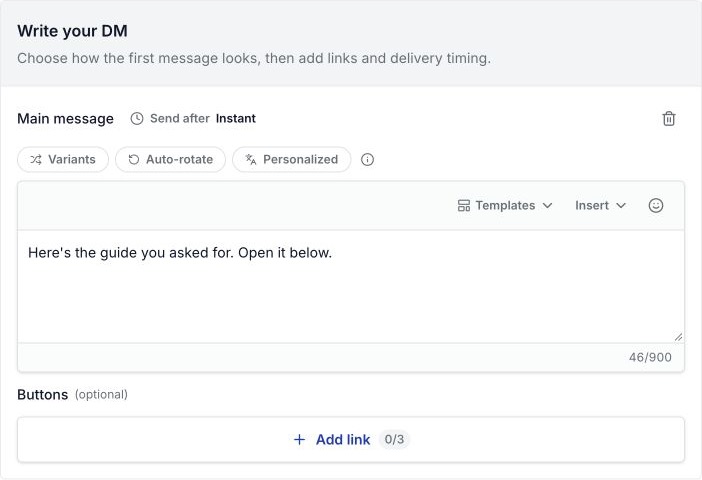
- Find Write your DM. If there is no main message, choose Add message → Text.
- Write a short reply, such as “Here’s the guide you asked for. Open it below.”
- Below the text, choose Add link.
New to the builder? Start with comment reply setup.
Add the label and URL
- In Button label (optional), use a name such as Open guide or View product. Keep it within 20 characters.
- In URL, paste the full link, including
https://. - Choose Add link in the dialog.
- Check the button in the message preview.
- Choose Save changes to save the automation. Check Go live if the reply should be active.
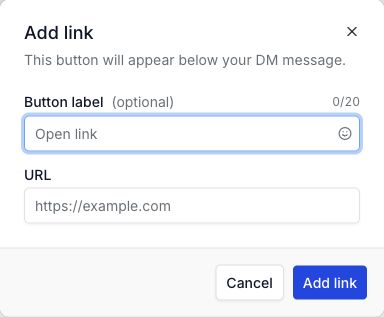
You can add up to three link buttons to a Text message. For one promised resource, one button is usually enough.
Check the saved link
- Test the reply from another Instagram account.
- Open the received button inside Instagram on a phone.
- Check that the right product or guide opens.
- For a public guide, open the link while signed out of its file service too.
The Add link dialog saves the button in the editor. Save changes saves the full automation. Finish both steps.
Change or fix a button
- Wrong link: use the button’s edit control, replace the URL, and save the automation again.
- Page asks for access: check the file’s sharing settings. Your own account may have access that readers do not.
- Button is missing: check that you added it to the Main message you are testing, then save again.
- No DM arrives: follow the missing-DM checks.
For a whole download campaign, read sending a free guide through Instagram DMs.