


In short
- Put your guide at a link that readers can open without asking for access.
- Use GUIDE in your caption and comment rule. Send the promised link in a short DM.
- Test from another account, then open and save the guide on a phone.
You finish a useful checklist. Someone comments GUIDE on your Reel. Now they need a link they can open, not a “request access” screen.
The simplest setup is to put your guide online and send its link in a DM, or direct message. In WinkSend, a comment rule can send that reply when someone uses your chosen word.
This guide uses a PDF link. You can use the same steps for a checklist page or template.
Get the guide link ready first
Use your website or a file service you already use. You need a link to the finished resource, not the page where you edit it.
Open it while signed out. Check:
- The guide opens without asking you to approve each reader.
- The title matches what your post promises.
- Text is easy to read on a phone.
- Readers can save the file if you offer a download.
- The shared file contains only the details you want to make public.
A web page can be easier to read on a small screen. A PDF can be useful when people want to save or print a checklist. Pick the format that suits the task.
Using Google Drive?
For a guide meant to be public:
- Open Share on the finished file.
- Under General access, choose Anyone with the link.
- Choose Viewer, then copy the link.
- Open the copied link while signed out and check the download option.
Google’s sharing guide explains these settings. A work or school account may block sharing outside the organisation. Share the guide file itself, rather than a folder containing other work.
Tell people exactly what they get
Here is a sample campaign. Replace the packing checklist with your own resource.
Reel caption:
Packing for a weekend trip? Comment GUIDE and I’ll send the free packing checklist.
First DM:
Here’s the weekend packing checklist: [your guide link]. Open it and save a copy for your next trip.
If you collect an email before the download, say so in the caption. “Comment GUIDE for the link. Enter your email on the page to get the checklist” sets a clearer expectation.
For more help choosing when to ask for details, read the lead-collection guide.
You can also ask people to DM GUIDE or reply GUIDE to a Story. Use DM keyword setup or Story reply setup for those triggers. Test the one you choose before sharing the offer.
Add the reply in WinkSend
Connect your Instagram Business or Creator account. Then:
- Open Instagram → Automations.
- Choose New automation → Standard Builder.
- Choose Post & Reel Comments + DM.
- Select Specific post and choose the post that offers your guide.
- Add GUIDE under Set your keyword. Leave Any keyword off for this campaign.
- Under Write your DM, choose Add message → Text. Add your short reply and guide link.
- For this simple setup, leave the opening message, follow request, and email request off.
- Turn on Go live, choose Save changes, and check the rule’s status.
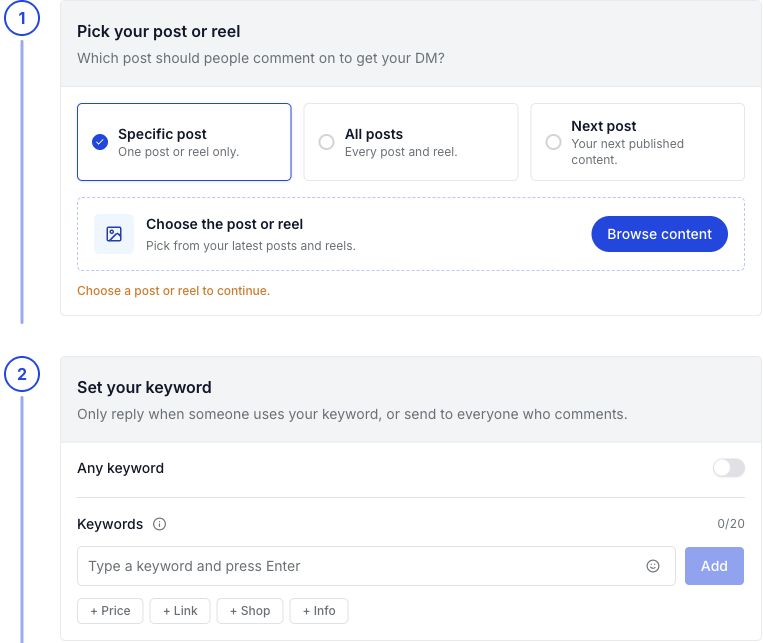
If the post is not published yet, you can use Next post. After publishing, check that the rule points to the post you meant to use.
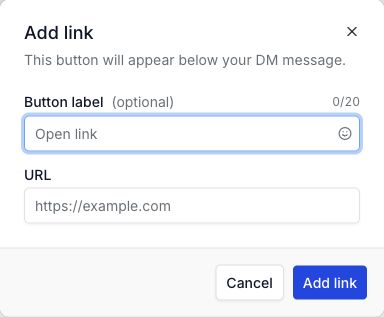
In a Text message, choose Add link. Use a label such as “Open guide”, then paste the finished guide URL. Follow the link-button steps if you need help with this part.
Can I send the PDF itself?
WinkSend’s message picker also has a PDF block. Rich content blocks are included in Professional; check current plans before choosing that path.
The picker below shows the available block types. Your plan controls which ones you can use.
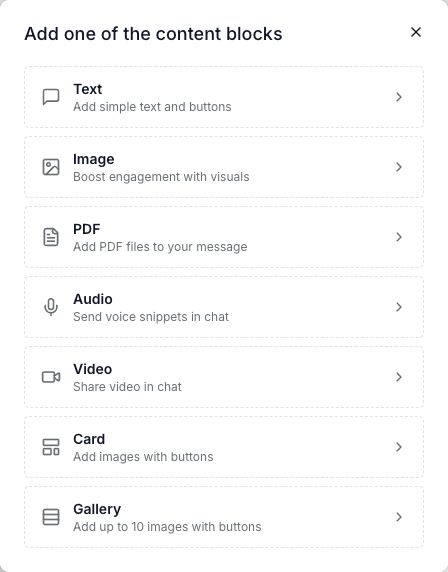
This walkthrough uses a link so you can keep the resource on your own site or file service. For a file message, follow the image and PDF steps.
Test the download, not just the DM
Use another Instagram account that has not already tested the post:
- Comment GUIDE on the selected post.
- Check the inbox and message requests.
- Open the link from inside Instagram.
- Read the first page on your phone.
- Save or download the guide if that is what you offered.
Then try the link while signed out of the file service. Your own account may have access that readers do not.
| What went wrong? | What to change |
|---|---|
| No DM arrived | Use the missing-DM checks. |
| “Request access” appeared | Check the finished file’s sharing settings. Test again while signed out. |
| The wrong file opened | Replace the link in the saved message. Open the new link yourself. |
| The guide is hard to read | Use larger text or offer a web version for phones. |
| Readers cannot save the PDF | Check download access. Do not call it a download until saving works. |
Leave room for a real question
A useful first reply gives the resource the person asked for. You can add “Reply here if the link won’t open” when you can help with replies.
Do not treat a download click as permission to send a series of DMs. Meta’s comment-reply rules allow one initial private reply within seven days. Later messages require a recipient response and must be sent within 24 hours of that response.
If you want to send future email updates, make that choice clear on your sign-up form. Keep delivery of the guide and the offer of more updates easy to understand.
Keep the link useful after launch
Before sharing the Reel again, open the link. Check that the guide is still available and the advice is current.
Count sent DMs, link visits, and downloads separately where you can measure them. A sent message does not tell you whether someone opened the guide. Mark a number as unknown if your file service cannot show it.
You can start with one checklist and one reply in WinkSend. Get that path working before adding more steps.
The cover is an illustration. The caption and replies are samples to edit.