

Disclosure: this guide is published by WinkSend. It compares published plans, not hands-on test results. There is no overall cheapest winner.
Compare published prices and limits
Third-party prices checked on October 6, 2026. WinkSend prices and limits come from its pricing feed when this site is built. Check the linked plan page before paying.
| Tool | Free plan | Entry paid price | What to check |
|---|---|---|---|
| WinkSend | 1,000 runs/month; 3 active rules | Creator: ₹499 INR or $9.99 USD/month | Runs count a rule starting. AI credits have their own limit. Paid plans still follow Meta's rules. |
| CreatorFlow | 500 automated DMs/month; 1 Instagram account | Pro: $15 USD/month | Pro includes 5,000 DMs per workspace/month. Annual option: $144/year, equal to $12/month. |
| LinktoDM | $0; confirm the usage unit and account limit | Pro: $15 USD/month | Its Free card says 2,000 DMs and 2 accounts. Its table says 2,000 contacts and 3 accounts. Ask which limit applies. |
| Manychat | 25 active contacts/month; up to 4 live triggers | Essential: $168 USD/year, equal to $14/month | Annual billing, not a $14 monthly payment. Includes 250 active contacts. Check the monthly offer and extra-contact charges. |
These are selected options, not every tool on the market. INR and USD are separate offers, not currency conversions. Taxes, extra usage, and regional offers may change the total.
What does link-to-DM automation do?
Someone comments LINK on your Instagram post or Reel. The tool sends the promised link in a private message, or DM. This is often called comment-to-DM automation. LinktoDM is also the name of a tool in the table above.
A low-cost tool should cover your reply type and expected use. A small price is less useful if the plan cannot send your link or runs out during your campaign.
How to compare costs fairly
Write down three things before picking a plan:
- How many people may ask for your link each month.
- How many posts need a reply rule at the same time.
- Whether you need extra features, such as email collection or follow-up messages.
Then check what each plan counts. A DM is a message. An active contact is a person you interact with during the billing period. A WinkSend run is one eligible comment or message starting a rule. A public reply and DM in that response count as one run.
In WinkSend, open Billing → Limits & usage to check how runs are counted.

These numbers do not mean the same thing. For example, one person may receive several messages. Do not compare a price per message with a price per contact as if they were equal.
Example: one guide campaign
Suppose 300 different people ask for your guide in one month. You have one reply rule and no extra steps. This is a planning example, not a test result.
CreatorFlow’s published Free allowance of 500 DMs can cover 300 one-message replies. Manychat’s published Free allowance of 25 active contacts would not cover 300 different people. For WinkSend, compare 300 rule starts with the current Free run allowance in the table. For LinktoDM, confirm whether its Free limit counts DMs or contacts before making the same calculation.
If you add a second message, repeat requests, or several accounts, check the limits again. Sending still depends on the account connection and Meta’s rules.
When each tool may fit
WinkSend: start with a link reply
Consider WinkSend if you want a free starting plan for Instagram replies. All Posts and Ask to Follow are included. Creator adds follow-up messages. Professional adds email and phone collection. Use the feature and plan guide to check the current allowance and account needs.
The builder lets you choose a message type. A Text reply with a link is a different choice from a PDF or audio block. Check the plan feature list for the block you want.
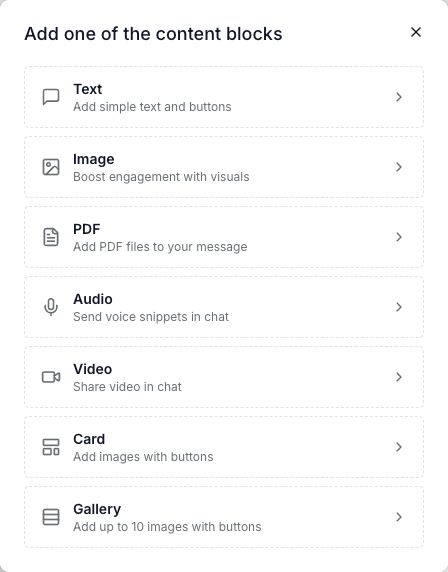
Choose a plan for the steps you need. A larger run allowance alone does not unlock every feature.
CreatorFlow: compare a clear DM allowance
CreatorFlow may fit an Instagram-only link campaign. Its Free plan lists comment-to-DM and Story replies. Pro adds email collection and link click tracking. Check the workspace allowance if you connect more than one Instagram account.
LinktoDM: check the plan details before paying
LinktoDM may fit a flow that needs delays or follow-ups with conditions on Pro. Its published Free limits are not consistent across its pricing card and table. Confirm these details with the tool before choosing it for a larger campaign.
Its annual card also lists $10/month alongside $126/year. Those totals do not match exactly. Use the confirmed checkout total for an annual purchase. The comparison above uses the separate $15 monthly Pro price.
Manychat: consider your other channels
Manychat may fit if you need Instagram plus another messaging channel and an inbox. The Free plan allows two channels. Its pricing counts active contacts rather than DMs. Check extra-contact charges and which features need a higher plan.
If your current tool already does this work within your budget, keeping it may save you the work of rebuilding your replies.
Free plan or free trial?
A free plan has its own ongoing limits. A trial lets you try a paid plan for a short time. Check the end date and whether you must add a payment method.
CreatorFlow’s paid trial lasts 14 days and needs a payment method. It charges after the trial unless you cancel first. Its Free plan is separate. WinkSend also has a separate Free plan; see the current paid trial terms.
Check before you launch
- Connect through the tool’s official Instagram login.
- Pick one post and one word, such as GUIDE.
- Write the promised reply and open its link yourself.
- Test from a separate Instagram account.
- Check your allowance and what happens when it runs out.
An official connection does not promise that an account can never face a restriction. Avoid tools that ask you to hand over your Instagram password. Follow Meta’s messaging guidance.
For a full walkthrough, read how to set up a comment reply and check missing DMs.
Which plan should you choose?
Start with a free plan if its reply types and limits cover your first campaign. Pay when you need more use or a feature the free plan lacks. Compare the full bill, not only the price shown beside the word “from.”
Use the official pricing links in the table to confirm your currency, billing period, account limit, and extra charges. Prices can change after this review.