


In short
- Start with one outfit and one post. Send the right product link or size chart.
- Use a short automatic reply. Let your team help with fit, stock, and custom orders.
- Test from another Instagram account before sharing the post widely.
Someone sees a dress on your Reel and comments “Link?” You can send that dress’s product page in a private message, without typing the same answer again.
That’s a useful place to start with Instagram DM automation for a clothing brand. A DM is a direct message. You choose the post, the comment word, and the reply it sends.
The tricky part is sending the right details. A link to your whole shop leaves the person searching for the dress they just saw. A size chart for another collection can make the reply even less useful.
What shoppers ask under an outfit post
This screenshot from Jayaa’s Couture shows several comments saying “Price” or “Pp” under the same outfit. It gives you a concrete question to plan a reply around.
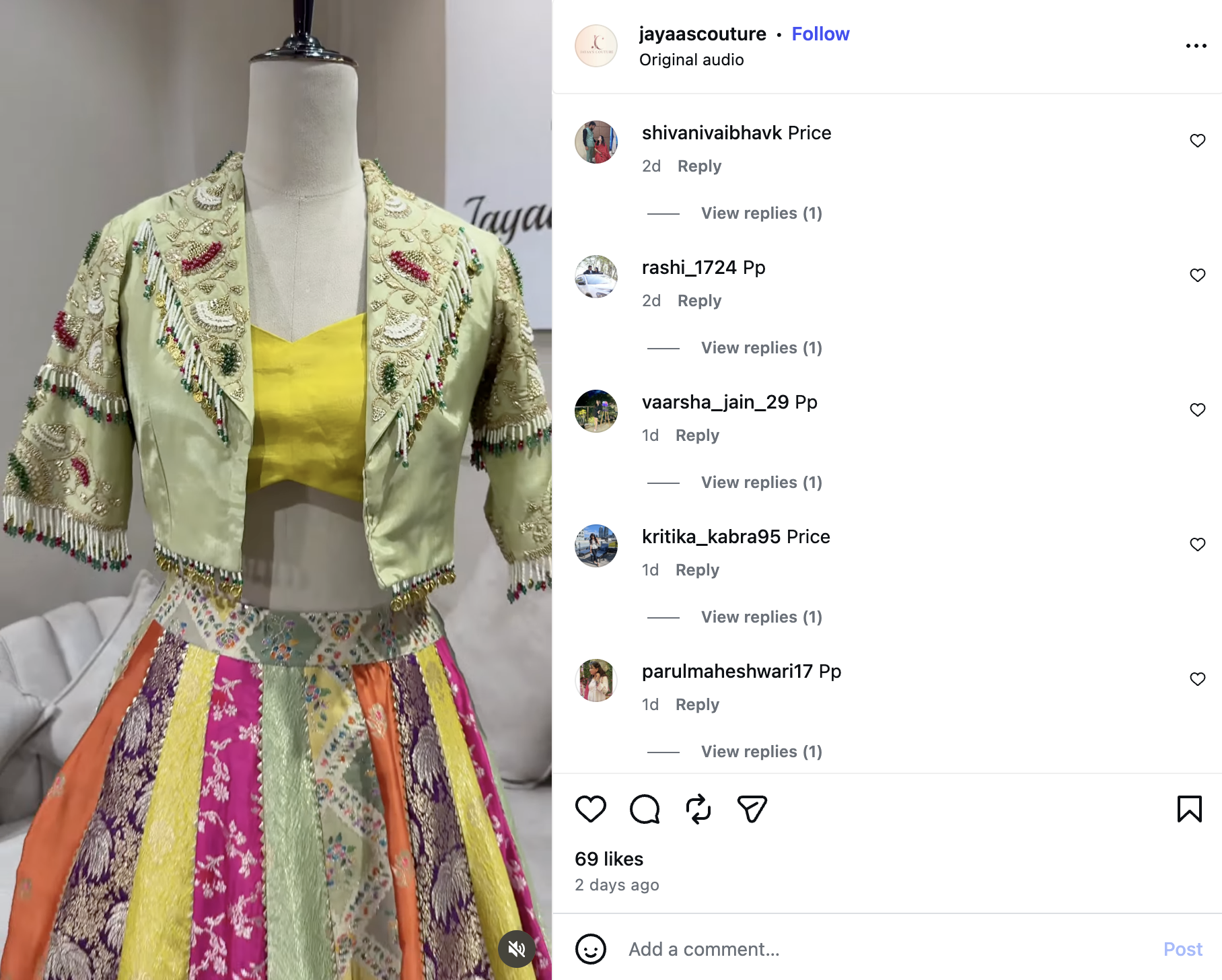
For a post like this, a useful saved reply would link to this outfit’s current price and details. You could choose PRICE as the comment word and include it in the caption.
“View replies” is visible, but the replies are closed. This image doesn’t tell us how the shop answered or whether it used automation.
Which questions can you answer with a saved reply?
Start with the questions that have a checked, repeatable answer:
- “Where can I buy this?” → the outfit’s product page.
- “What’s the price?” → a page showing its current price.
- “Can you send the size chart?” → the chart for that item.
- “Where is your shop?” → the address and opening hours.
A question like “Can you change the neckline?” needs your team. So does a delivery request for a specific event date.
For stock questions, send the product page or ask a person to check. A saved reply won’t know that the last medium-size dress just sold. Live stock answers need a working connection to your current stock data.
What a shop profile tells you about the reply
Jayaa’s Couture’s public Instagram profile lists clothing for women, men, and kids. It also shows a Jaipur shop location and a website.
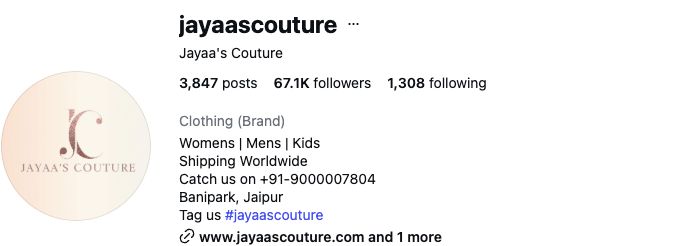
Those details suggest different replies for different posts. A ready-to-buy outfit can lead to its product page. A post about visiting the shop can lead to visit details.
For custom clothing, the reply can help someone start a conversation. Ask which outfit they want and when they need it. Your team can then discuss the work and timing.
Keep that choice tied to the post. A person asking about a kurta should not have to search through bridal outfits to find it.
Give each outfit the right link
Say your first Reel shows a red dress. The next shows a blue kurta. You use LINK in both captions.
Give each Reel its own reply rule and product link. A rule covering all posts is useful only when the same reply fits them all.
Keep a simple note for each rule:
- Post: red dress Reel.
- Comment word: LINK.
- Reply link: that red dress’s product page.
- Follow-up questions: the person on your team who checks the inbox.
If a Reel shows several outfits, link to a page that names each one. Put the same names in the Reel or caption. “The second outfit” becomes hard to follow when the page uses a different order.
Replies you can copy and change
These are sample messages. Replace the bracketed links and details with your own before using them.
When someone asks for the link
Caption: “Want this red dress? Comment LINK for the product page.”
Reply:
Here’s the red dress: [product link]. You’ll find the price and sizes there. Reply if you need help choosing a size.
Check where the link opens. The dress should be easy to spot on a phone, with its price close by.
You can show the price in the caption too. The comment gives people a quick way to get the link; it doesn’t have to be the only way to find the price.
When someone asks for a size chart
Caption: “Comment SIZE for this kurta’s size chart.”
Reply:
Here’s the chart for this kurta: [size chart link]. It uses [cm or inches] and shows [body or garment] measurements. Between sizes? Reply and we’ll help.
Body measurements are the person’s measurements. Garment measurements are the clothes’ measurements. Label the chart so the shopper knows which they are comparing.
A request about how an outfit will fit still needs care. Share the chart, then let your team help with that person’s question.
When someone wants to try an outfit
For a shop that offers trials, use a caption such as: “Want to try this in our shop? Comment TRIAL for visit details.”
Reply:
You can find our visit details here: [visit details link]. Which outfit would you like to try, and what day suits you? We’ll check the time and availability.
This starts the booking conversation. The visit is confirmed when your team or booking system accepts it.
When the outfit sells out
Change the saved reply as soon as you know the item is sold out:
This dress is sold out right now. You can see similar styles here: [collection link].
If you have a website restock list, add its sign-up link. Explain what people are signing up for. Check Instagram’s reply rules below before promising a later DM.
Set it up in WinkSend
We build WinkSend. Here’s how to start a comment-to-DM rule in its standard builder.
1. Get the account and product page ready
Use an Instagram Business or Creator account. Connect it through the official login and allow the access needed for replies.
Open the product link on a phone. If you’re using a catalogue instead of a shop website, check that someone outside your team can open it.
2. Choose the option that sends a DM
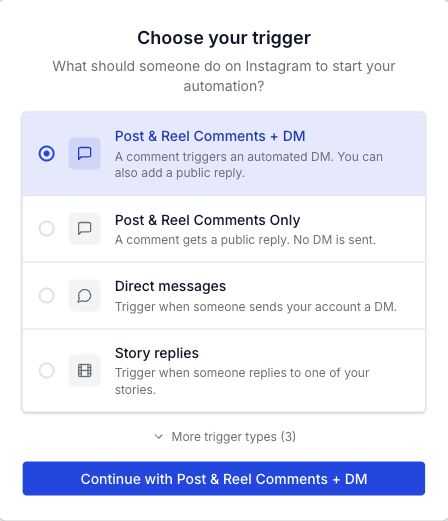
Open Automations, choose New automation, then Standard Builder.
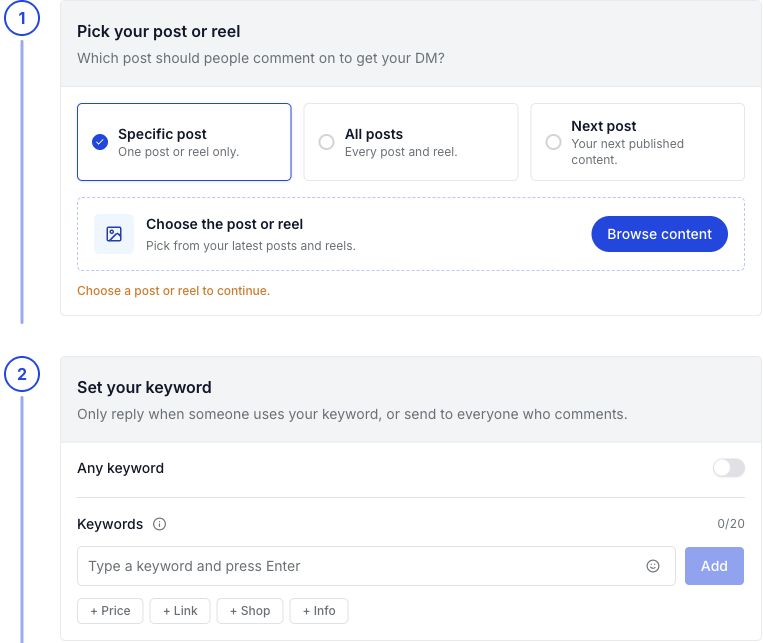
Select Post & Reel Comments + DM. This uses a comment to start the private reply. Post & Reel Comments Only sends a public comment reply without a DM.
3. Add the outfit’s post and reply
Choose the post or Reel. Use the comment word from its caption, then add your message and link.
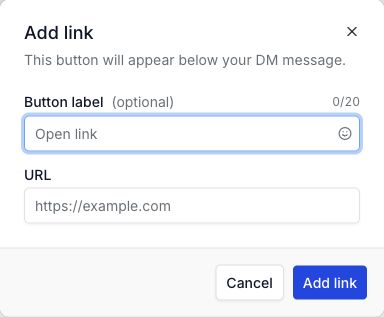
In the text message, choose Add link. Give the button a clear label, such as “View outfit”. Paste the product URL.
For price and size requests, sending the answer directly keeps the task short. If you add a follow step, say that in the caption so people know what to expect.
The comment-to-DM guide explains the post choices in more detail. Check current WinkSend plans for active rules and monthly runs. A run is an eligible comment or message starting a rule.
If shoppers send PRICE straight to your inbox, use DM keyword replies. For “Reply SIZE” offers in a Story, follow the Story reply steps.
4. Leave a test comment from another account
Turn on the rule when it’s ready. Use a separate Instagram account to comment with the chosen word.
Check:
- The DM contains the correct outfit link.
- The link opens on a phone.
- The price and size chart are current.
- A comment without the chosen word behaves as you intended.
- A repeated comment behaves as expected; another DM is not guaranteed.
Use a non-following account for one test. Its private reply may be in Message Requests.
If the DM is missing, work through the missing DM checklist. It covers the post choice, word, account access, active rule, and run allowance.
Can you message the shopper again later?
For a post or Reel comment, Meta allows one initial private reply within seven days of that comment.
Follow-up messages are allowed after the person responds, within 24 hours of their response. These are Meta’s private reply rules.
So a comment today doesn’t let you send restock promotions next month. A separate website waitlist may fit that job better.
Opening a shop link is also different from replying to the DM. ManyChat’s comment trigger documentation explains that a website-button click alone does not open its messaging window.
Read the questions that come back
After the post goes out, check what shoppers ask next. That tells you what the first reply or product page is missing.
- Still asking the price? Make it easier to find on the linked page.
- Asking which outfit the link shows? Check the item name and destination.
- Asking about measurements? Add clear units and explain the chart.
- Asking about custom changes? Let a person take over that conversation.
Count product page visits and confirmed orders separately. A sent DM tells you a message went out; it doesn’t tell you an order was placed.
Start with one outfit you can keep up to date. Once that reply works, use what you learned for the next post.
A few other questions
Do I need a website?
No. A public catalogue or shop visit details can work. Check the link from an account outside your team, and make it clear how the person can order.
Do I need AI to write every reply?
No. A saved message can send the same product link each time. That’s enough for a simple LINK or SIZE request.
Can I use the same word on every post?
Yes, if each post’s rule sends the right reply. Check that a broad rule doesn’t also catch the word and send a different outfit.
Sources
- Meta: Instagram private replies — when you can send a private reply and follow-up messages.
- ManyChat: Post and Reel comment triggers — why a shop-link click is different from a DM reply.
- Jayaa’s Couture on Instagram — the public profile and price questions shown in this post.
- WinkSend app — the setup screen shown in this post.
About the examples
The Jayaa’s Couture images are public examples. We have not verified that the shop uses WinkSend. No delivery campaign or sales result was tested for this article. The sample messages are for you to adapt.
Screenshots were captured or supplied on 13 October 2026. The cover image is a generated illustration.
Create a free WinkSend account to set up your first outfit reply.