Turn on an opening message, then enable Ask for an email before sending the main DM. The person taps the opening message’s quick reply, shares their email, and then receives your main message.
Email collection is included in Professional. Check current plans if the control is locked.
Prepare the reply
Start with a connected account and a comment reply rule. Add the link you want to deliver to the Main message.
Tell people in the post if an email is needed to get the resource. For example: “Comment GUIDE. I’ll ask for your email in the DM, then send the checklist.”
Turn on the opening and email steps
- Open your automation in Instagram → Automations.
- Under Advanced settings, turn on Send an opening message before the main DM.
- Write that first message and check its Quick reply button. This button starts the next step when tapped.
- Turn on Ask for an email before sending the main DM.
- In this email step’s Opening message, ask the person to type their email in the chat.
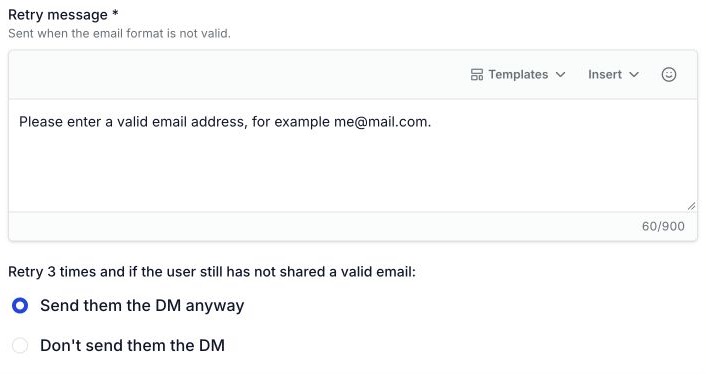
- Write a Retry message for an email that is not in a valid format.
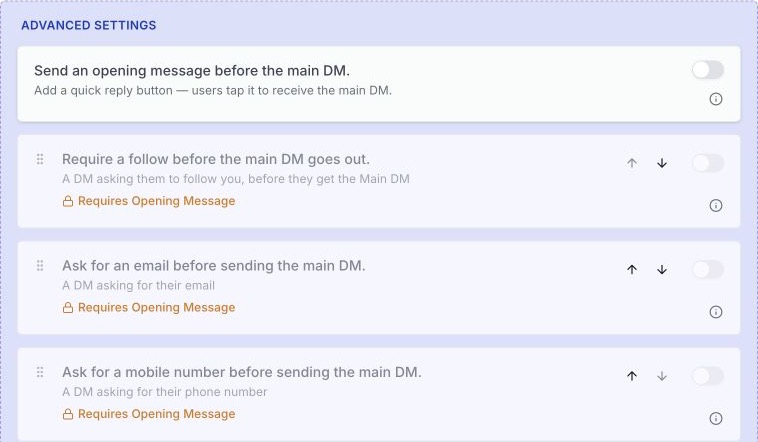
Here are sample messages to edit:
- Email request: “Which email should I save for this guide? Type it here, then I’ll send the link.”
- Retry: “Please enter an email like name@example.com.”
There are two messages to check: the first opening message asks for a tap. The email step’s opening message asks for the email.
Choose what happens after retries
After three failed email attempts, choose one of these:
- Send them the DM anyway: send the main message even without a valid email.
- Don’t send them the DM: stop before the main message.
Choose Save changes. Check that Go live matches whether you want the rule active.
Test and find the email
- From another Instagram account, leave the rule’s comment word.
- Open the DM and tap the quick reply.
- Enter an email you control. Check that the main message arrives.
- In WinkSend, open Contacts and find that Instagram username. Open the contact and check Email.
Test the invalid-email path too. A valid format does not prove that the person owns the address or can receive mail there.
If the reply stops
- Email switch is locked: check plan access and enable the first opening message.
- Only the opening DM arrived: tap its quick reply before expecting the email request.
- No main message after an invalid email: check your retry choice.
- Contacts is unavailable: ask the workspace owner to check your access.
For help deciding when to ask for details, read the lead collection examples.