
Automatic Instagram link sharing
Send links automatically in Instagram DMs.
Ask people to comment LINK on your Reel. WinkSend sends a direct message, or DM, with a button that opens the product page you chose.
You can also send a link after someone replies to your Story or sends a word to your inbox. Start with the link you get asked for most.
1,000 free runs a month. No card or UPI needed.
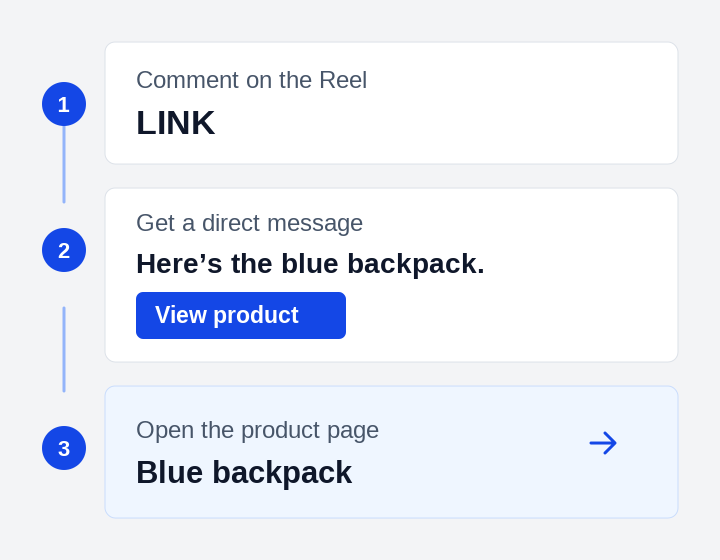
Send the product shown in your Reel
Say you show a blue backpack. In the caption, ask people to “Comment LINK for the blue backpack.” Pick that Reel in WinkSend and save the link to the backpack page.
Make the next tap easy
Check that the product page opens on the blue backpack and shows the price. If it sells out, update the saved reply or pause the rule on the old Reel.
Choose what starts the link reply
For the odd request, you can send the link yourself. Use a saved reply when people keep asking for the same link.
| Where they ask | When it fits | Setup guide |
|---|---|---|
| Reel or post comment | One Reel shows the backpack. Ask people to comment LINK under it. | Post and Reel comments |
| Story reply | A Story shows how the backpack fits. Ask viewers to reply SIZE for its size chart. | Story replies |
| Direct message | Your profile tells people to message CATALOG for the same shop link. | DM keyword replies |
WinkSend allows one active Direct messages rule per Instagram account. Words in that rule share one reply. Use separate post rules when different Reels need different links.
Match the link to what you promised
- One item. Send the exact product page. If the Reel shows a color or size, open that option when your shop supports it.
- Several items. Send a collection page with the items you showed. Use a button like View collection.
- A guide or a file. Send a public page or a file that opens while signed out. If people need to give an email first, say so in the post.
- A time to book. Send the page for the service or class you offered. See how to send a booking link.
Add the button in WinkSend
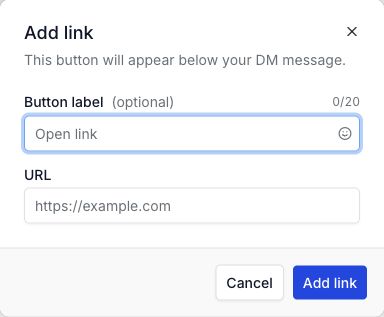
Connect an Instagram Business or Creator account and choose how the reply starts. In your Text message, choose Add link. Paste the full URL and use a clear button label of up to 20 characters. Save the button and the automation.
Check the reply and the link on a phone
- Try the exact request. From another Instagram account, leave the comment or send the word from your post. Check the inbox and message requests. Meta’s private reply guide.
- Tap the button inside Instagram. Check the exact item, price, and availability. Open a shared file while signed out to check that anyone with the link can read it.
- Try it again after edits. If the offer, price page, or product URL changes, update the saved reply and test the new link.
If the message is missing, check the chosen post, the word, and whether the rule is live. Find where a comment reply stopped.
Start with the plan this reply needs
A simple reply with a link button can start on Free. See current plans and limits.
Free
₹0 INR / $0 USD
Free plan
Send a link button from a post comment, Story reply, or DM keyword.
1,000 runs/month
3 active reply rules
Creator
₹499 INR / $9.99 USD
Billed monthly
Use follow-ups when the conversation and Instagram’s rules allow them.
Unlimited* runs/month
Unlimited* active reply rules
Professional
₹1,299 INR / $19.99 USD
Billed monthly
Collect contact details in the chat or send a PDF file as a message.
Unlimited* runs/month
Unlimited* active reply rules
An automation is a saved reply rule. A run is an eligible comment or message starting it. If you reach your monthly run allowance, new replies stop until it resets or you upgrade. *Unlimited runs are on WinkSend’s side; Meta’s messaging rules and separate AI credit limits still apply.
Questions before you start
Can two Reels send different product links?
Yes. Make a separate comment reply rule for each Reel. Pick the specific Reel and add its own product URL. You can reuse LINK as the word because each rule watches a different Reel.
Can one DM include more than one link?
A WinkSend Text message can have up to three link buttons. Start with one when you promised one item. Add a second button when it helps someone choose, such as View product and See size chart.
Why did someone get a message without the link?
Check for an opening message, follow request, or email step. The person may need to finish that step before the main message arrives. For a simple link reply, put the link button in the main Text message and keep the extra steps off.
More ways to use the reply
Try your first link reply.
Choose one post, one word, and one useful link. Test the reply before you promote it.