
Instagram DM automation for salons
Share salon prices and booking links by DM.
Instagram DM automation for salons sends a saved reply when someone comments a word, replies to your Story, or messages your account with a keyword.
Share your current service menu and booking page while your team works with clients. Keep personal quotes and service questions with your staff.
1,000 free runs a month. No card or UPI needed.
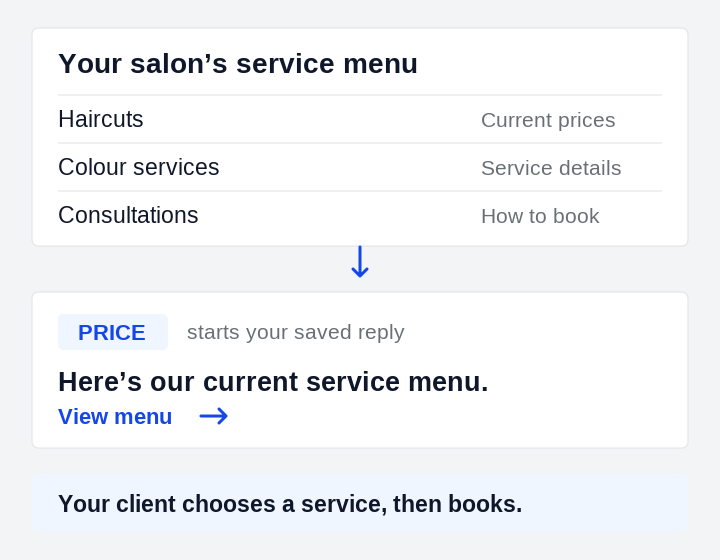
Choose the question your salon hears most
Start with one service or repeated question. A haircut Reel, a colour consultation, and a weekend appointment request may need different destinations. Match the saved message to the offer shown in the post.
These are sample captions and replies. Set up and test each campaign separately. Button labels show what the sample DM would contain; these examples are not live customer conversations.
A service price list from a Reel
Caption: “Want our haircut prices? Comment CUT for the menu and booking page.”
Link to the current haircut menu. Include what each service covers. When a price is a starting price, make that clear on the menu instead of sending everyone a fixed quote.
A booking link from a Story
Story text: “Looking for an appointment this week? Reply BOOK for the booking page.”
Send the page that shows current availability. A saved message cannot know that the last Friday slot has just been taken. Avoid promising that a time is held.
A colour consultation before a quote
Caption: “Planning a colour change? Comment CONSULT for our consultation page.”
Use this when staff need to understand the request before confirming a service. Keep the saved reply focused on arranging that conversation.
One menu for repeated inbox requests
Ask people to DM MENU when they want your service list. Include directions and the booking route on the page so clients can find the next step.
The current DM keyword workflow allows one active incoming-DM rule. Words in that rule share its reply. Use a common menu rather than promising a different answer for every word.
Send clients to the right service page
Your salon’s main page may be useful for someone browsing. A client asking about one service usually needs a shorter route. Use the page that answers their question without making them search again.
| Client’s request | Useful destination | Keep current |
|---|---|---|
| “What does this cut cost?” | Haircut menu with clear service names | Prices, inclusions, and stylist options |
| “Can I book this week?” | Your live booking page | Open times, branch, and appointment length |
| “Which colour service should I choose?” | Consultation page or staff contact form | How to ask for help before booking |
| “Where is your salon?” | A location page with directions | Address, parking notes, and opening hours |
If you run more than one branch, name the branch in the post, reply, and destination. A client should not finish booking at a different location from the one shown in the Reel.
Build one salon campaign first
Have the current service-menu or booking URL ready. Use a connected Instagram Business or Creator account, then begin with one post and a simple saved Text reply.
- Choose a clear service post. Use a haircut Reel for the haircut menu. Pick Specific post so the offer and destination stay together.
- Add one clear word. For the haircut campaign, use CUT in the caption and rule. Avoid a short word that could match unrelated messages.
- Write the reply and add its link. Send the promised menu. Use a button such as View haircut menu, then save the button and the automation.
- Check from another account. Leave the word under the Reel. Open the received DM on a phone and follow the menu through to booking.
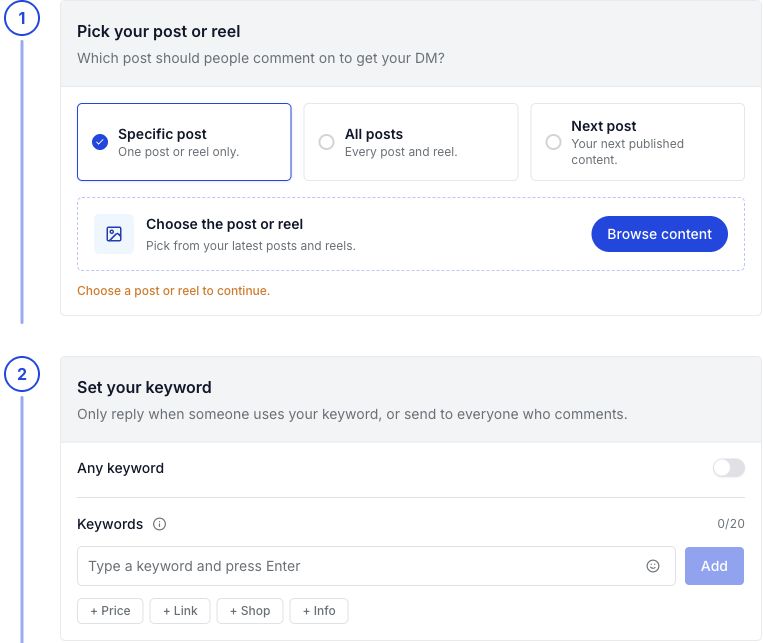
For a Story campaign, use Story reply setup. A separate Story rule is needed; saving the Reel campaign does not turn on Story replies.
Keep personal service questions with your team
A saved reply can share information. Your staff still need to answer requests that depend on the client, service, or appointment. Choose who will check those messages during the day.
Useful saved replies
- The current service menu and starting prices.
- Your booking, consultation, or location page.
- A clear way to ask the salon for help.
Questions for a person
- “Which service should I choose for my hair?”
- “Can you fit two people in together?”
- “Can I change my time or use my deposit?”
A staff reply could say: “Which service are you looking at, and what day suits you? We’ll check before confirming.” Treat that as a manual reply example. Do not tell clients a slot is reserved until your booking process confirms it.
Check these before your next salon Reel
- Prices: the menu states what is included and which prices can change after a consultation.
- Services: the booking page uses the same service names as the post. Clients can tell a consultation from a full appointment.
- Branch and stylist: the destination shows the right location and explains any choice the client must make.
- Hours and dates: open times come from your booking page. An old “today only” Story or offer should not keep sending an outdated promise.
- Deposits and changes: clients can find the payment, cancellation, and rescheduling terms before confirming.
- Phone access: test the received button inside Instagram. Check the service choice and confirmation screen, not just the first page.
When a menu or offer changes, edit or pause its saved rule. Keep old posts in mind before using All Posts for the same word and reply.
Each week, compare campaign requests with confirmed salon appointments in your booking tool. Note questions your team still receives. If clients keep asking which service to choose, improve the menu or send them to a consultation.
Start with the plan this reply needs
A simple booking or service-menu link can start on Free. Add paid features when the campaign needs them. See current plans and limits.
Free
₹0 INR / $0 USD
Free plan
Send a menu or booking-page link. Choose one service campaign and check the full client journey before adding more.
1,000 runs/month
3 active reply rules
Creator
₹499 INR / $9.99 USD
Billed monthly
Add follow-up features when the conversation and Meta rules allow them. Use the salon booking system for appointment confirmations and reminders.
Unlimited* runs/month
Unlimited* active reply rules
Professional
₹1,299 INR / $19.99 USD
Billed monthly
Collect email or phone details inside the DM when the campaign needs them. Rich content blocks can share a PDF service menu; a hosted menu link can start on Free.
Unlimited* runs/month
Unlimited* active reply rules
An automation is a saved reply rule. A run is an eligible comment or message starting it. If you reach your monthly run allowance, new replies stop until it resets or you upgrade. *Unlimited runs are on WinkSend’s side; Meta’s messaging rules and separate AI credit limits still apply.
Questions before you start
Can my salon send a price list from an Instagram Reel?
Yes. Choose the Reel, add a word such as PRICE, and save a reply with your current service-menu link. Ask viewers to comment that word. Use the menu page to explain starting prices, what is included, and any consultation needed.
Will WinkSend check our calendar or hold a salon appointment?
WinkSend sends the saved booking URL. Your booking service shows available times and confirms the appointment after the client completes its steps. The DM does not hold a chair, choose a stylist, or confirm a deposit.
Can PRICE, BOOK, and HOURS each send a different inbox reply?
Do not set that expectation for the current Direct messages workflow. One active rule is allowed per Instagram account, and its words share one reply. You can send one clear service menu from that rule, or use post-specific campaigns for different offers.
Can clients get a booking link from a Story reply?
Yes. Set up the Story reply trigger and ask people to reply with your chosen word. Test it separately from a Reel-comment campaign. A reply to your Story and a mention in someone else’s Story are different triggers.
What if prices depend on hair length or the service needed?
Share your menu’s price range and consultation route. Say what affects the final quote. Your team should confirm the service and price before the appointment; a saved reply should not make a personal assessment.
How should we handle deposits and cancellations?
Put the current terms and payment steps on your booking page. Check that the client sees them before confirming. Payments, refunds, changes, and cancellation messages follow your booking service and salon process.
Set up the part your salon needs
Start with one salon service.
Choose one post, one word, and one useful link. Test the reply before you promote it.